
AI Birthday Rap Video: Make a Personal Greeting
Create an AI birthday rap video with Music With Me. Choose a birthday co-star, add a shared memory and build a friendly message around one detail.
An AI birthday rap video works best when the birthday person can recognize themselves in the idea, not just in the photo. Put them on the mic with someone they know, add their name and choose one memory or habit to celebrate. Music With Me gives you the two-person generator; your brief gives the performance a reason to exist.
You do not need to write a complete song first. A concise birthday message is a better starting point than a long biography. The generator can adapt the words, so plan the theme rather than promising yourself an exact line-by-line performance.
Start with the person, not the punchline
Before selecting photos, decide what tone they would enjoy. Some friends love a playful roast. Others would rather hear a warm thank-you or a cheerful shout-out. If you are unsure, choose a friendly message you would be comfortable reading aloud at their party.
Pick one detail that makes the greeting theirs: their Saturday breakfast order, a holiday you took together or how they always organize the family gathering. A recognizable detail does more work than several generic compliments.
Keep the recipient's audience in mind. A private joke can work in a small group chat while confusing everyone at a larger celebration. Make the message understandable to the people who will actually watch it, and avoid including personal information that does not belong in a shared video.
Build a birthday brief in four parts
Use this order: name, occasion, personal detail and mood. For example:
Happy birthday, Morgan. Make a cheerful rap about our Sunday coffee walks and how you always bring an extra pastry. Keep it affectionate and playful, with an original upbeat beat.
The name tells the model whom to address. The occasion anchors the theme. The pastry detail gives the message character. The mood keeps the joke friendly. Each part has a purpose, so you can shorten the brief without losing its meaning.
If you use the Birthday topic button, edit the opening instead of stopping at “Happy birthday.” One added sentence can separate your greeting from a generic celebration. These example briefs are writing suggestions; their exact wording and audio have not been guaranteed by a generation test.
Choose a birthday co-star
The second person should make sense in the story. Pair the birthday person with a friend, sibling, partner or family member who shares the memory you describe. You can use two separate portraits even if you do not have a recent photograph together.
For a rap stage, use clear faces with visible heads, shoulders and chests. Avoid photos with drinks, hands or sunglasses hiding the face. A photo that looks great in an album may still be difficult for a model to interpret if the birthday person's face is small or turned away.
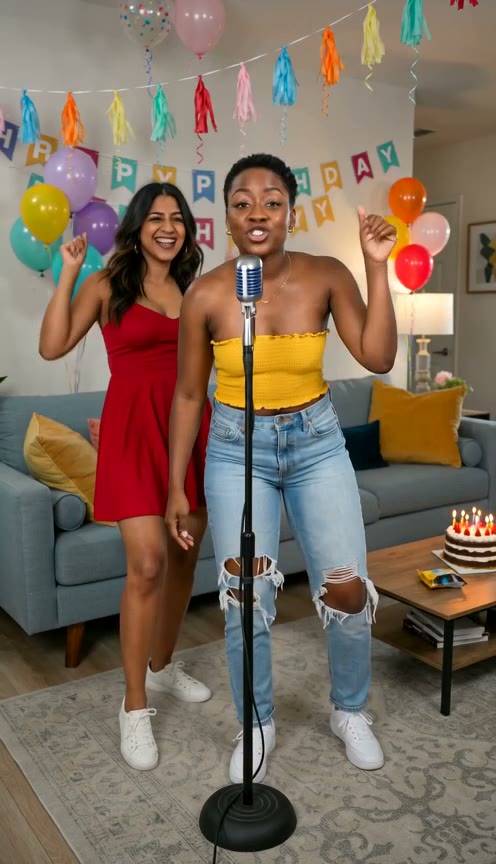
Authorized birthday showcase: balloons, bunting and two familiar-looking co-stars communicate the occasion before any lyrics are heard. Your generated scene may look different.
Read the birthday example as a composition
In the image above, the birthday decorations establish the theme while the people remain the focus. The microphone provides a clear performance cue. There is room for gestures without placing large props across the faces.
Use that balance when writing your own scene. Ask for a birthday atmosphere without listing every possible decoration. A few balloons and warm light can be enough. The more important instruction is that both performers stay visible and the rap remains about the recipient.
Choosing a stage sets the starting direction. Adding a party detail to the message does not guarantee that the model will recreate this exact room, clothing or decoration. Treat the image as a useful example of how a clear occasion and readable duo can coexist.
Make the clip in Music With Me
Open the homepage generator, select Rap Video and add your two portraits. If a clear photograph already contains both people, choose One photo together. Check the images before continuing.
Choose a stage and enter your birthday brief. Hotel Lobby offers an orange studio direction, while Luxury Lobby can suit a more polished celebration. Pick the setting for the recipient's personality rather than assuming a birthday video must look like a party room.
Review the available duration, format, resolution and audio settings. Select supported audio when you want rap vocals and music. Check the credit quote, then sign in to submit. Pricing offers credit packs and subscriptions if your current balance is insufficient.
Review before sending the surprise
When My Videos shows a successful result, watch it with sound. Check whether the recipient's name is understandable, whether the joke remains kind and whether both faces stay recognizable. The message can be adapted during generation, so do not skip listening just because the picture looks good.
If a name is mispronounced, consider a familiar nickname the recipient uses and accepts. If the message tries to cover too much, remove secondary stories. If a joke sounds harsher than intended, rewrite the mood explicitly and simplify the wording before another attempt.
Download the finished clip and choose how to send it. A direct message gives the recipient room to enjoy it privately; a group chat can make sense when the story belongs to the whole group. Ask before posting a recognizable person's birthday video publicly.
Three ideas that stay personal
- The tradition: celebrate the coffee run, game night or yearly trip you always share.
- The thank-you: name one thing they do for others and make the rap appreciative.
- The reunion: let the video say you miss being together and are looking forward to the next visit.
Choose the idea that belongs to your relationship. Then open the Hotel Lobby AI generator, add your birthday duo and make a short greeting around that one detail.